Case study · UI/UX design

MyMosQ: UI/UX Design for Mosque Management Software

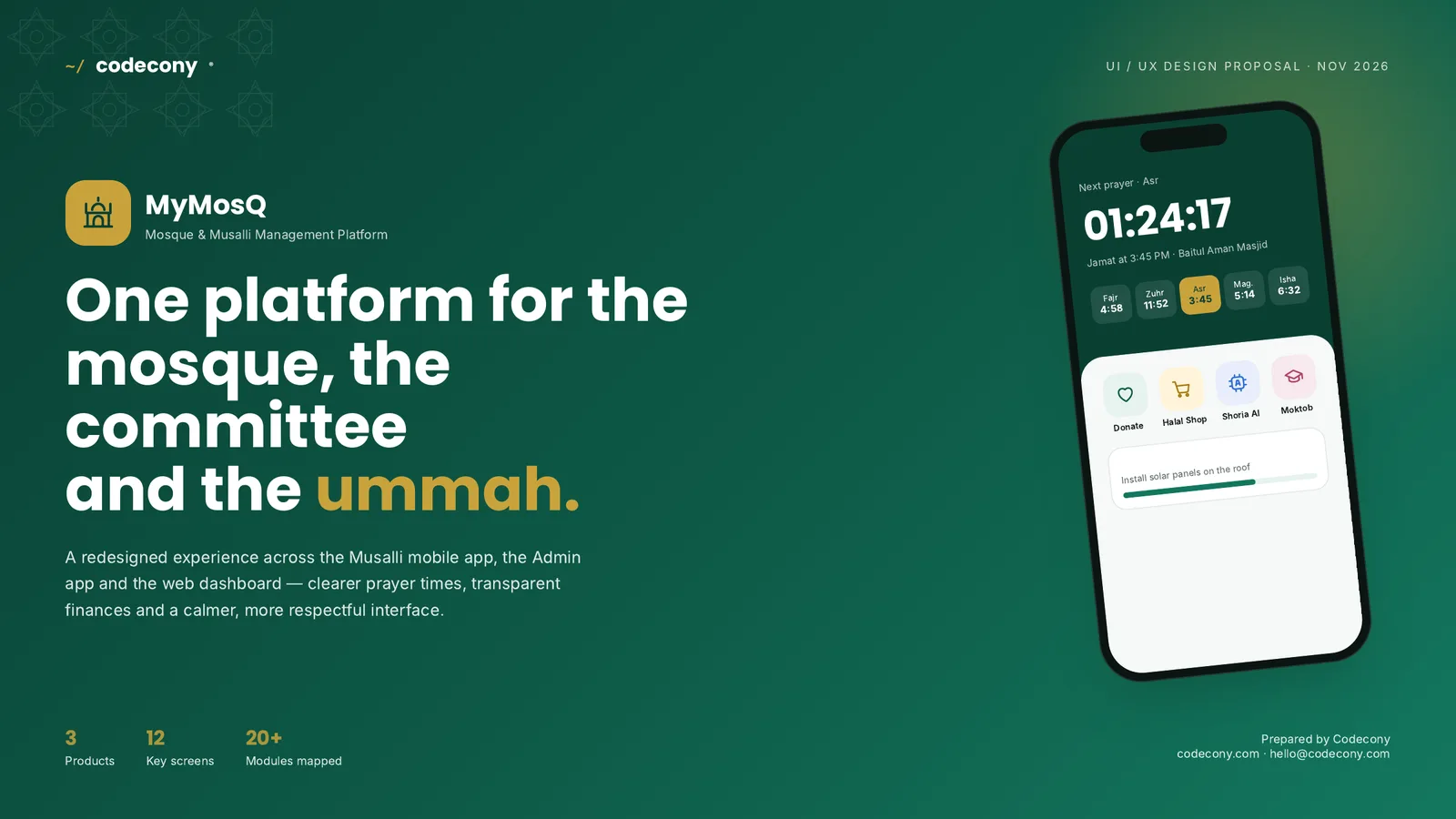
MyMosQ helps a mosque share prayer times, collect donations, run committee votes, and track income, salaries, and stock. Codecony redesigned its musalli app, admin app, and web dashboard around one design system, so musallis find the next jamat in a glance and the committee sees the mosque's finances on one screen.

MyMosQ mosque management app cover with the musalli app home screen and prayer countdown
Product
MyMosQ, mosque and musalli management platform
Industry
Religious and community organizations
Market
Bangladesh, with Bangla and English
Platforms
iOS, Android, web dashboard, TV display
Our scope
UX audit, information architecture, UI design, design system
Year
2026
The challenge

Why the first version was hard to use

The client came to us with a working web app and three hand-drawn layouts. Every feature was there. The problem was finding it.

More than 20 features on one screen

The original dashboard showed every module as an equal button: income, khutba, salary, marketplace, voting, and more. Nothing told a musalli where to look first.

Three apps that looked unrelated

The musalli app, the admin app, and the web dashboard used different colors and layouts, so moving between them felt like switching products.

Users from teenagers to elders

Older musallis need large text and simple steps. Committee members need tables, totals, and exports. One design had to serve both.

Trust around money

Mosques run on donations. Musallis give more when they can see where money goes, and the old screens made finances hard to read.

Our approach

Four rules that shaped every screen

01

Prayer first

Every home screen opens with the next prayer, the jamat time, and a live countdown.

02

Group the modules

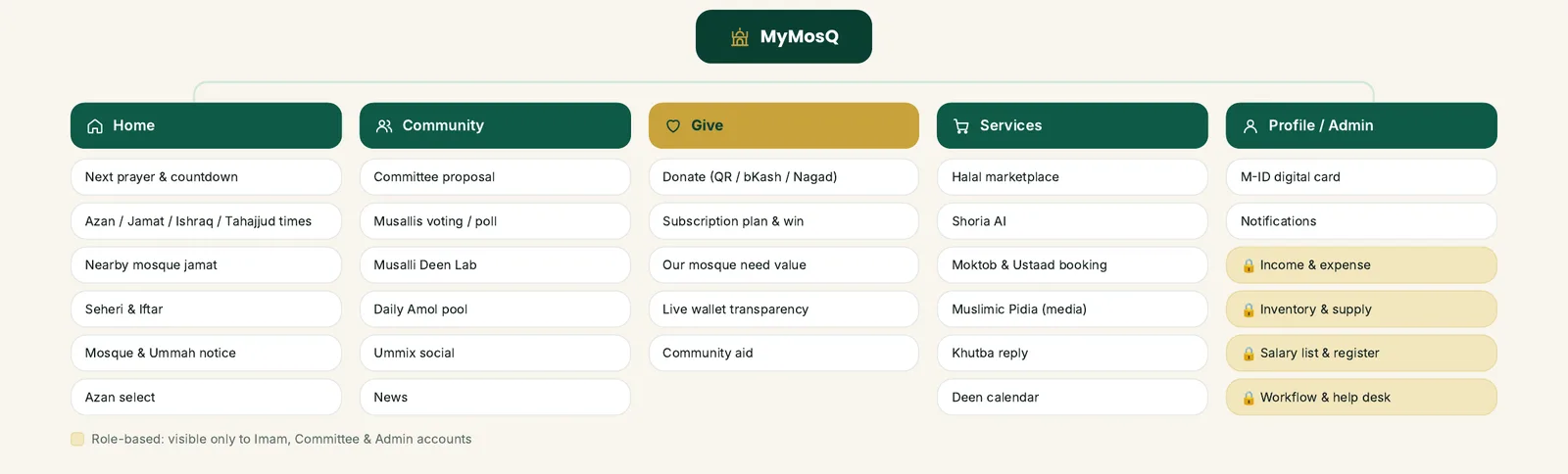
We sorted 20+ features into five tabs: Home, Community, Give, Services, and Profile/Admin.

03

Show the money clearly

Income, expenses, salaries, and donation goals appear as simple totals and progress bars.

04

Easy for elders

Large type, high contrast, a Bangla and English toggle, and touch targets sized for every hand.

MyMosQ information architecture: 20+ mosque modules grouped into five tabs, with admin-only modules marked
Information architecture: every module from the original sketches mapped to one of five tabs. Admin-only tools are marked.
The screens

Twelve screens across three products

Names, amounts, and times in these screens are sample data.

Musalli app

Home, prayer times, and community voting

The home screen leads with a live countdown to the next jamat and shows nearby mosques where a jamat is about to start. The prayer times screen lists azan and jamat times for every wakto with per-prayer alerts and the Hijri date. Committee proposals show live voting results so musallis can take part in decisions.
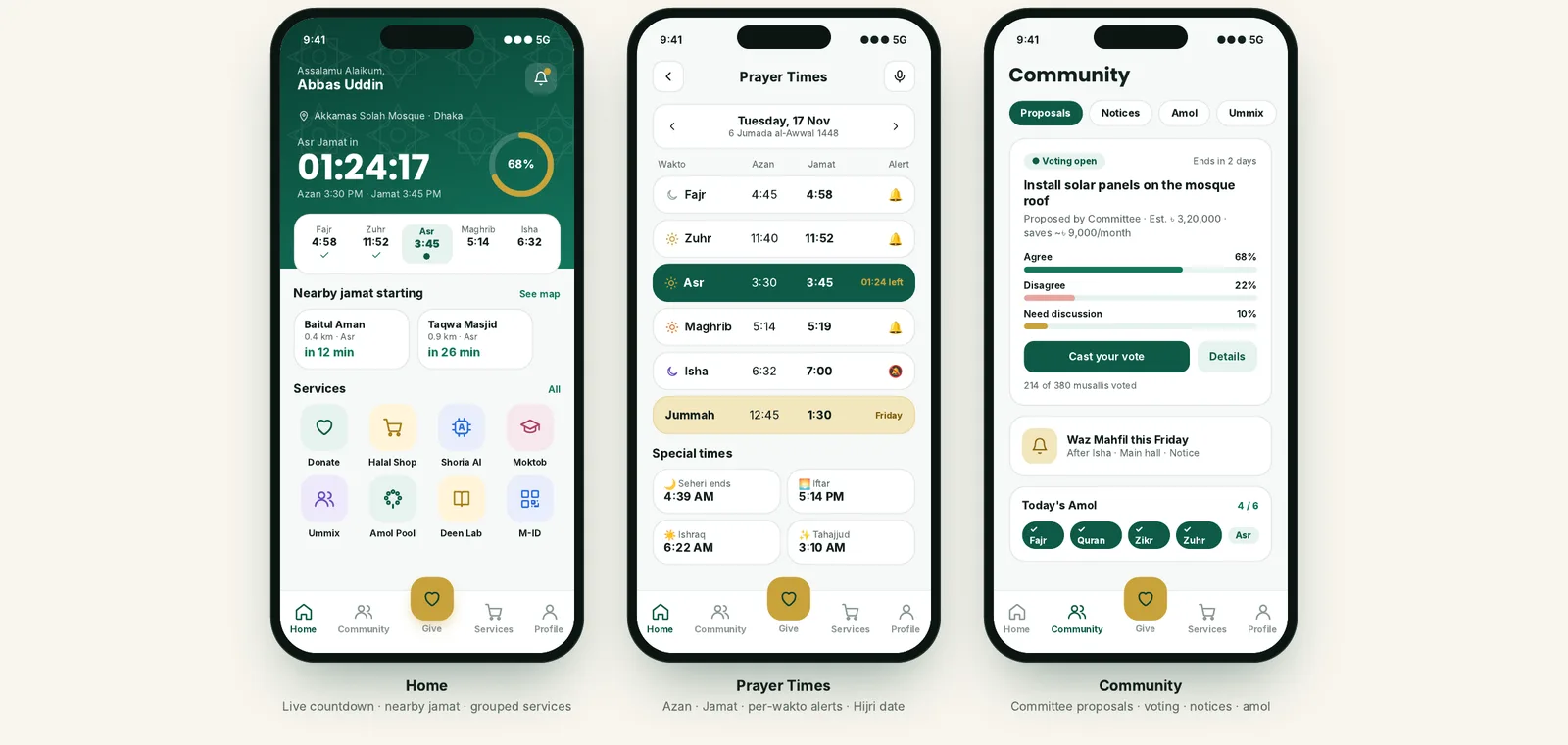
MyMosQ musalli app screens: home with jamat countdown, prayer times table, and community voting
Musalli app

Donations, Shoria AI, and Moktob booking

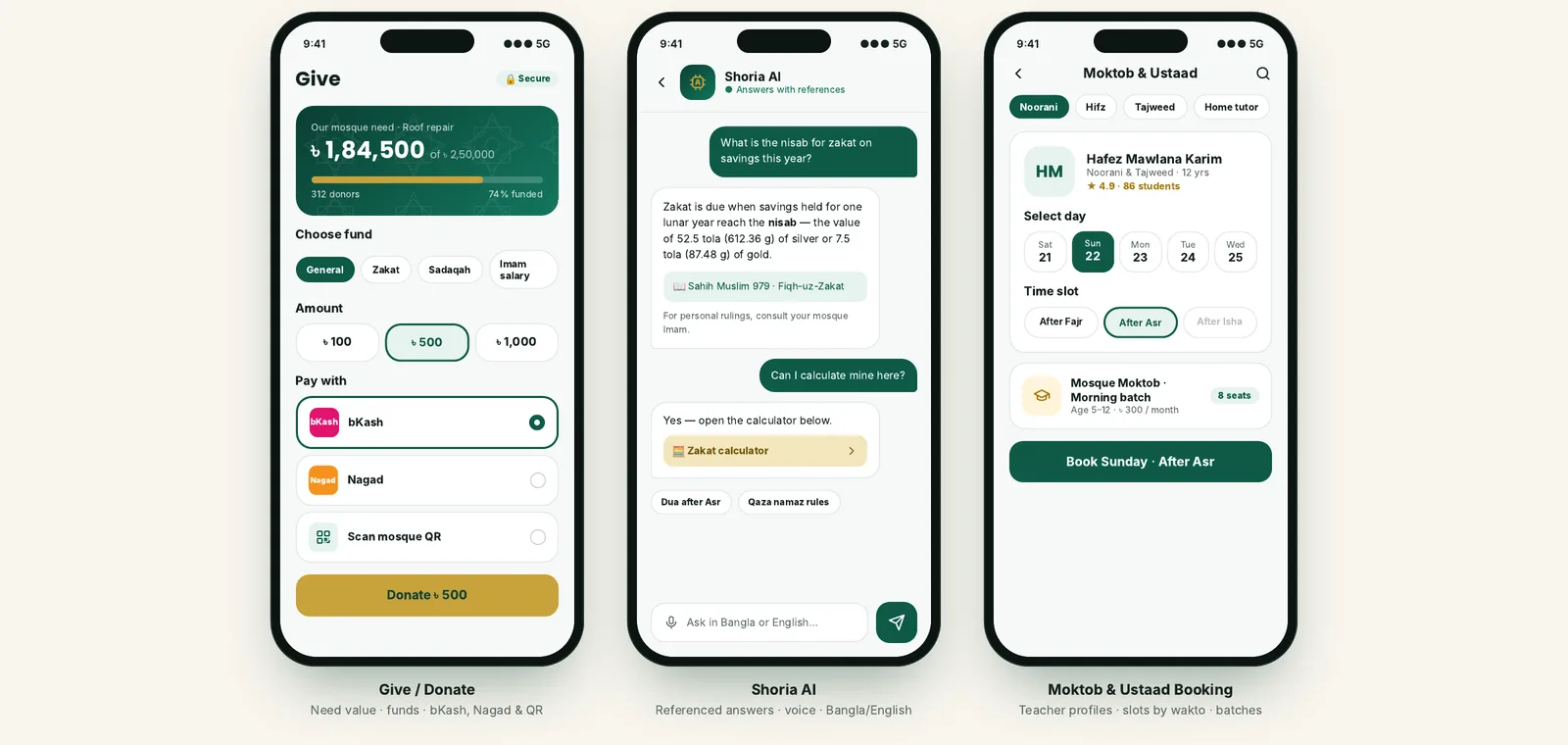
Giving has its own center tab. Musallis see the mosque's current need with a funding bar, choose a fund such as Zakat or Sadaqah, and pay with bKash, Nagad, or the mosque QR code. Shoria AI answers questions with references, and parents can book a Moktob ustaad by day and prayer-time slot.

MyMosQ musalli app screens: donation with bKash and Nagad, Shoria AI chat, and Moktob teacher booking
Admin app

Admin app for the imam and committee

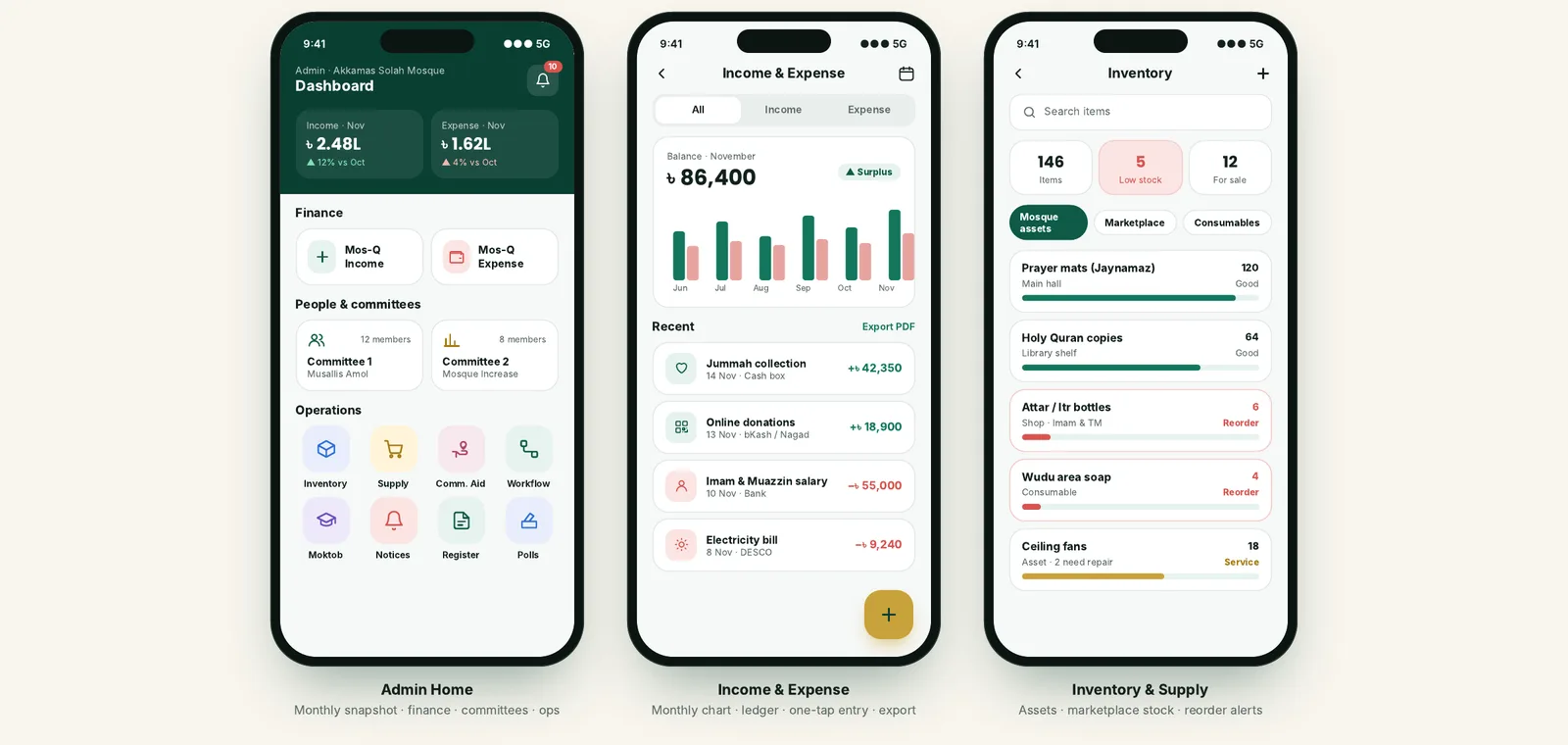
The admin home shows the month's income and expenses, the two committees, and shortcuts to inventory, supply, community aid, and workflow. The ledger charts six months of income against expenses and exports to PDF. Inventory flags low stock, such as prayer mats or wudu supplies, before it runs out.

MyMosQ admin app screens: admin dashboard, income and expense ledger, and mosque inventory
Web dashboard

A web dashboard for running the mosque

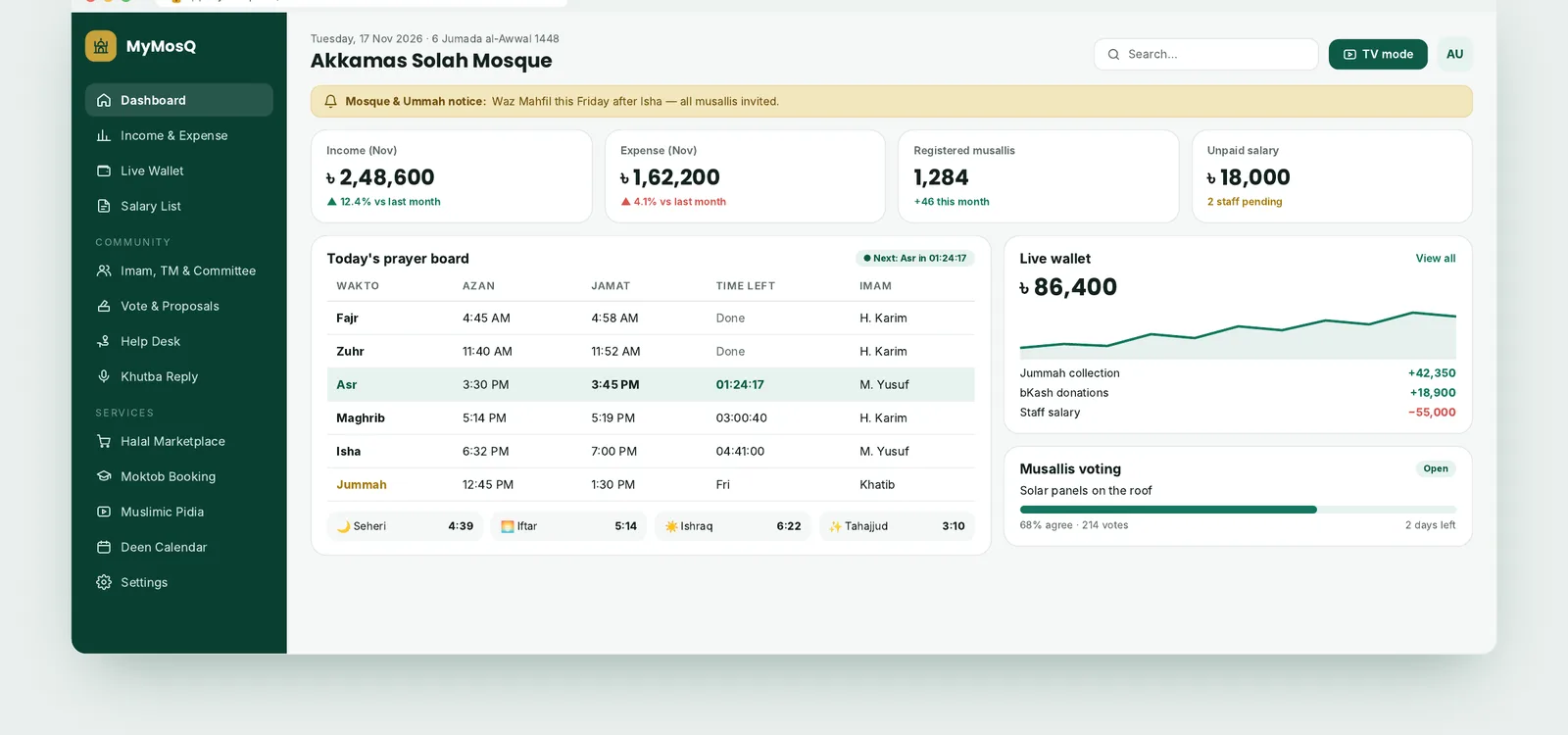
A sidebar holds every module. The top row shows income, expenses, registered musallis, and unpaid salary. The center holds today's prayer board with the imam for each jamat, and the right column shows the live wallet and open votes.

MyMosQ web dashboard with sidebar navigation, finance KPIs, prayer board, live wallet, and voting
Web dashboard

Staff salaries and a TV prayer display

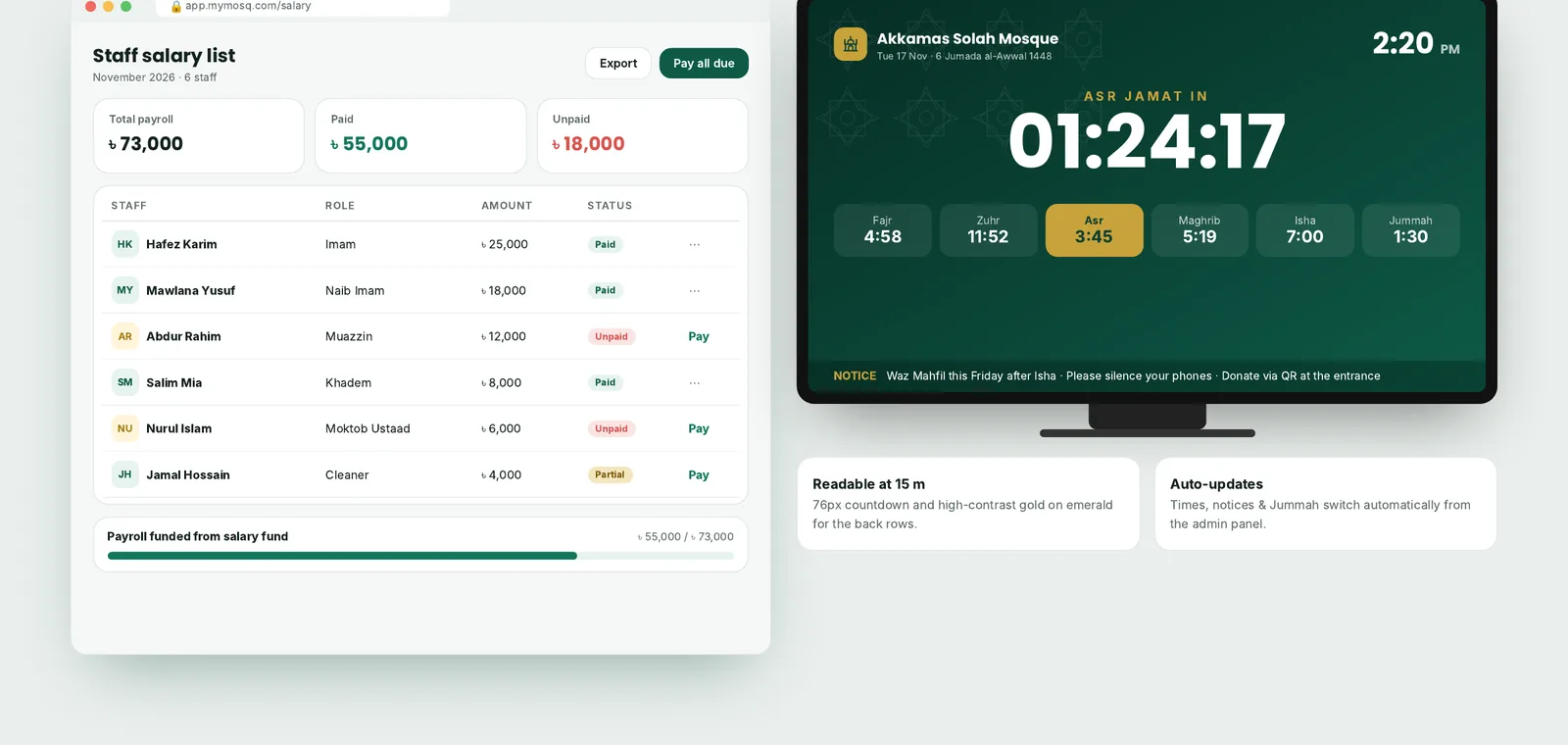
The salary list shows each staff member, role, amount, and paid status, with one button to pay what is due. TV mode turns any screen on the mosque wall into a prayer board with a large countdown, all six times, and a scrolling notice line.

MyMosQ staff salary list and full-screen TV prayer time display for the mosque wall
Design system

Emerald for calm, gold for what matters

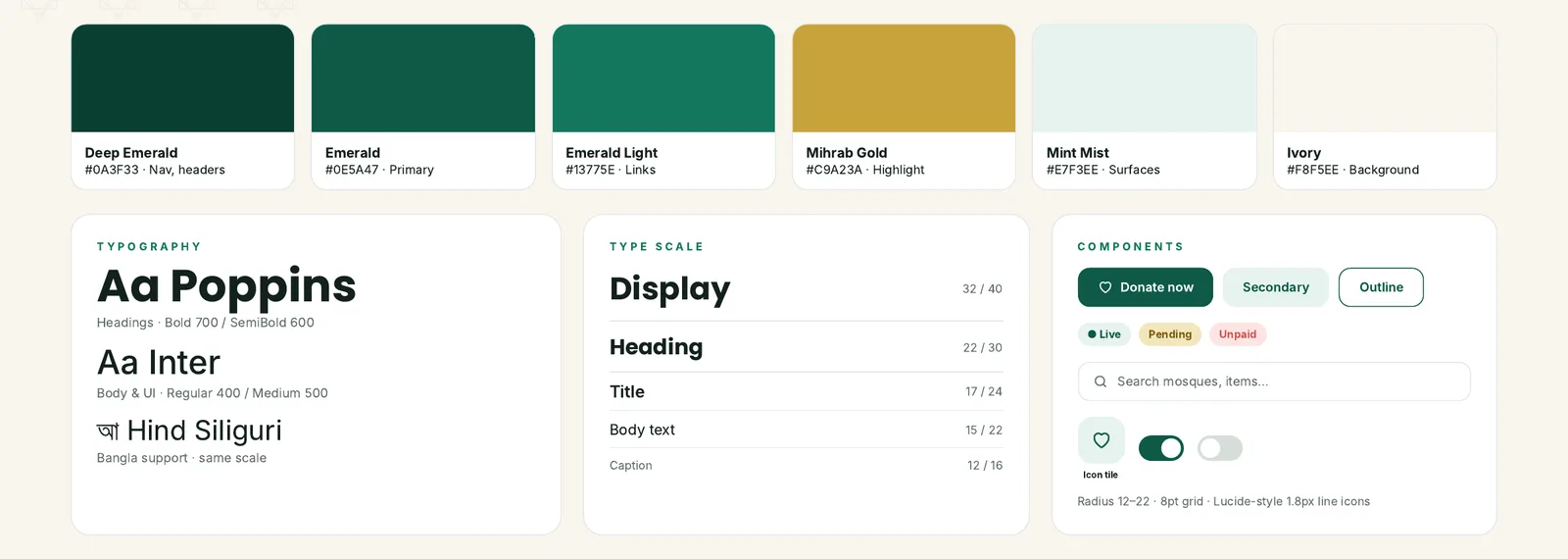
One palette replaced the mixed purple and brown of the first version. Gold is saved for the next prayer, the donate button, and goals, so it always marks the most important thing on the screen.

MyMosQ design system: emerald and gold color palette, Poppins, Inter and Hind Siliguri typography, buttons, chips and toggles
Features

What the mosque management software covers

  • Prayer and jamat times

    Azan and jamat times for every wakto, Jummah, Seheri, Iftar, Ishraq, and Tahajjud, with alerts.

  • Nearby mosque finder

    Shows mosques close to the musalli and how soon their next jamat starts.

  • Online donations

    Funds for general use, Zakat, Sadaqah, and salaries, paid through bKash, Nagad, or a QR code.

  • Income and expense tracking

    A ledger with monthly charts and PDF export for committee meetings.

  • Staff salary management

    Paid, unpaid, and partial status for the imam, muazzin, khadem, and teachers.

  • Committee proposals and voting

    Musallis vote on proposals and see results as they come in.

  • Inventory and supply

    Mosque assets, consumables, and marketplace stock with reorder alerts.

  • Notices and announcements

    Mosque and ummah notices pushed to phones and the TV display.

  • Moktob and ustaad booking

    Teacher profiles, batches, and booking by prayer-time slot.

  • Halal marketplace

    A shop run by the imam and committee with its own supply inventory.

Deliverables

What we handed over

  • UX audit of the existing app

    A review of the live web app and the client's sketches for the musalli, admin, and dashboard screens.

  • Information architecture

    A five-tab structure that gives every module one home and hides admin tools from regular musallis.

  • Design system

    Emerald and gold color tokens, Poppins and Inter type with Hind Siliguri for Bangla, buttons, chips, and line icons.

  • 12 key screens

    Six musalli app screens, three admin app screens, and three web dashboard and TV screens.

  • Design proposal document

    A 10-page proposal covering the overview, design system, architecture, screens, and next steps.

  • Build plan

    A four-phase plan from review to a clickable prototype, build, and a pilot with one mosque.

Planning an app with a mobile side and an admin side? See our mobile app development and web development services.

FAQ

Questions about mosque management software

What is mosque management software?

Mosque management software helps a mosque run its daily work in one place. It usually covers prayer and jamat times, donations, income and expenses, staff salaries, notices, and member records. Many systems also include a mobile app for musallis and a display for the prayer hall.

What features should a mosque management app have?

Start with accurate prayer and jamat times, notices, and online donations, since musallis use these every day. For the committee, add income and expense tracking, salary records, and inventory. Voting, Moktob booking, and a TV prayer display are useful next steps.

Can a mosque app accept bKash and Nagad donations?

Yes. bKash and Nagad both offer merchant payment options that an app can connect to. In MyMosQ we designed donations around bKash, Nagad, and a scannable mosque QR code, with funds such as Zakat and Sadaqah kept separate.

Can the app work in Bangla?

Yes. The MyMosQ design system pairs Poppins and Inter with Hind Siliguri for Bangla text at the same size scale, and every screen has a Bangla and English toggle.

Can Codecony build mosque management software for our mosque or organization?

Yes. We design and build mobile apps with React Native and web dashboards with Next.js and Laravel. Book a call, tell us how your mosque runs today, and we will suggest a scope.

Building an app for a mosque or community?

Tell us who will use it and what they need to do. We will reply with a scope and a quote.

We transform brands.
Your success is next.

Start your project now by booking a one-on-one consultation with our expert.

Meet the partners who are part of our success story

Snappr logo
LACP logo
Jinnifer Douglass logo
La Moment logo
Ashley Simmons logo
TXRH logo
LGRG logo
Full Logo logo
Hair Lounge logo